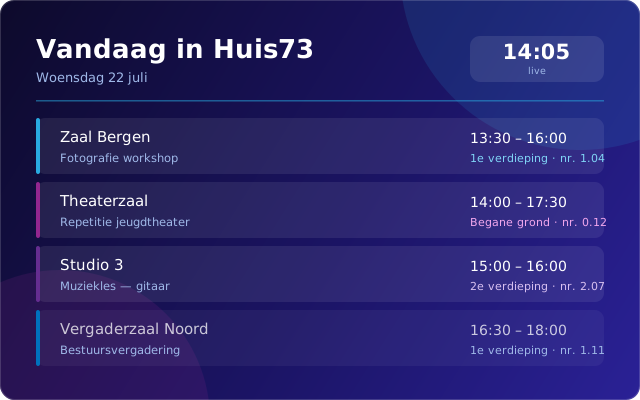
A multi-tenant staff and narrowcasting workbench for venues. It takes what is already in your booking system and puts it where people need it — on the TV in the foyer, on the tablet beside the door, and on the briefing sheet in the kitchen.
Every venue has the same gap. The reservation system holds the truth — which group is in which room, from when until when, with which catering — but that truth never reaches the foyer screen, the door tablet or the kitchen team. So somebody retypes it into a slide deck every morning.
SLinkHub Screens closes that gap without touching the booking process. It reads your reservation data and turns it into the displays and briefings a venue actually runs on: public wayfinding for visitors, an internal overview of today, and printable prep sheets for staff.
Nobody enters anything twice. The booking stays where it was made.
SLinkHub Screens is multi-tenant. Both live deployments run from a single backend, each with its own front-end, its own language and its own set of screens.
Visitor-facing displays on TVs throughout the building and on tablets beside each room, showing what is happening where and when. Alongside them, an internal "today" overview gives staff the full picture of the day, including the context that is deliberately kept off the public screens.
Wayfinding, TVs, room tabletsAn internal portal answering the question every shift starts with: who is doing what today, and in which kitchen or service category. Staff filter to their own category, and the same view prints as a PDF prep sheet for the people who would rather work from paper than from a screen.
Briefings, categories, printable PDFsSLinkHub Screens does not create reservations and does not modify them. Your booking system stays the system of record, and everyone keeps working the way they already do. That constraint is deliberate: a display layer that can also write is a display layer that can corrupt the booking.
What Screens does add is the venue-specific layer the booking system was never meant to hold — room display names, zones, room numbers, screen mappings and product categories. Those overlays live in Screens, sit on top of the synced reservation data, and can be changed without touching the reservation itself.
The result is a display that reads like your venue rather than like a database export.
Three steps, and none of them involve a screen calling your booking system in the middle of a busy Saturday.
A background worker pulls reservation data from the venue's reservation system on a cycle and writes it into a database.
Screens never queries the booking system live. It reads the synced data, so displays stay fast and the upstream system is never hammered by a wall of TVs.
Room names, zones, numbers, screen mappings and product categories are layered on, then rendered per tenant, per screen and per date.
Every venue uses a different subset. These are the pieces the two live deployments run today.
No, and it is not trying to. SLinkHub Screens is a read-side projection: your booking system remains the system of record for every reservation. Screens reads that data and presents it. Nothing is created or modified upstream.
A background worker syncs reservation data on a cycle, and the app reads from that store, so a change made in the booking system appears on the screens after the next sync. That indirection is what keeps the displays responsive and keeps a room full of TVs from putting load on your reservation system.
No. Public and internal views are separate feeds. The visitor-facing displays exclude rooms marked internal and blank out internal notes, while the staff overview keeps the full context. It is a rule in the product, not a habit staff have to remember.
It already does. Screens is multi-tenant by design — Huis73 and Faculty Club run from a single backend, each isolated to its own data, with its own front-end, language and screen configuration. Adding a venue is configuration and overlay data, not a second installation.
A reservation system we can read from, a list of your rooms and how you want them named and grouped, and a decision on which screens go where. We map the overlay with you, then stand up the tenant. Get in touch and we will walk through your building.
If your team starts every morning by copying the day's bookings into something else, that is the problem SLinkHub Screens was built for. Tell us how your venue runs and we will show you what it would look like.